UMLBasics
Table of Contents
UML Notation Elements
The following chapter contains excerpts from the book “UML 2 kompakt” by Heide Balzert. For a complete view of the UML notation you must refer to the book.
Object
In the object-oriented software development an object possesses a certain condition and reacts with a defiierten behavior to its environment. In addition, each object has an identity that distinguishes it from all other objects.
The state of an object includes the attributes or their current values and the respective object relationships to other objects. Attributes are inherent, unchanging characteristics of the object, while attribute values may be subject to change.
The behavior of an object is described by a set of operations. A change or a query of the state is only possible by means of the operations.
The object is represented in UML as a rectangle, which can be divided into two fields. In the upper field the object is designated as follows:
:Class
- if the object is anonymous, only the class name is specified.
object:Class
- if the object is to be addressed by a name.
object
- if the object name is sufficient to identify the object and the name of the class is evident from the context.
The name of the object is always underlined. Object names start with a lowercase letter in UML, class names with an uppercase letter. Anonymous objects are used if it is any object of the class. Object names are used to name a specific object of the class for the system analyst.
In the lower field - optionally - the relevant attributes of the object in the respective context are entered. The UML allows the following alternatives:
attributetype = value
attribute = value
- recommended, since the value can often be used to identify what type it is.
attribute
- useful if the value of the attribute is not of interest.
Class
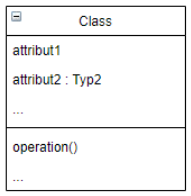
A class defines for a collection of objects their structure (attributes), behavior (operations) and relationships (associations and generalization structures).
The class name is a noun in the singular. Thus, it describes a single object of the class. Examples: Employee, Car, Customer.
Use Case Diagram
A use case describes the functionality of the software system that an actor must perform to obtain a desired result or to achieve a goal. Use cases should allow to talk to the future user about the functionality of the software system without getting lost in details right away.
An actor is a role played by a user of the software system. Actors can be humans or other automated systems. They are always external to the system.
A use case diagram gives a good overview of the software system and its interfaces to the environment at a high level of abstraction. The actors are often entered as stick figures, but can also be represented by a rectangle or pictogram (e.g., as a computer symbol).
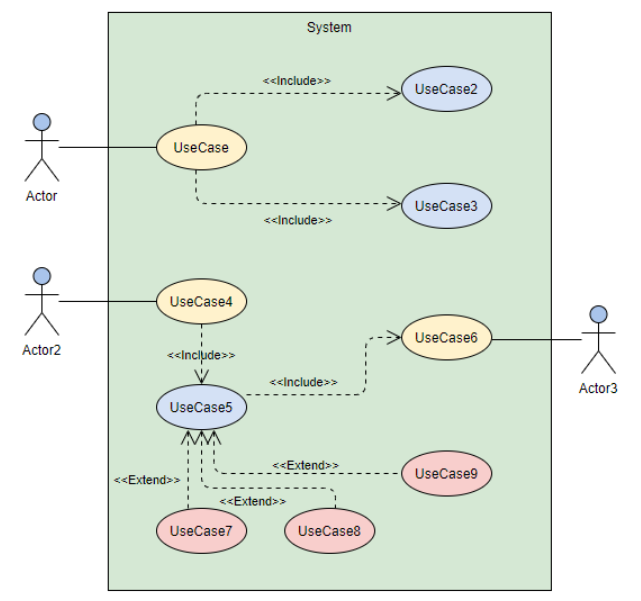
A line between actor and use case means that communication is taking place. The system under consideration is modeled as a large rectangle that includes all use cases.
With the help of the extend relationship, a use case A is extended by a use case B. The use case A describes the basic functionality, the use case B specifies extensions. Use case A can be executed alone or together with the extensions. For an extension to be inserted, a condition must be met. This condition can be specified as a note or comment if required and appended to the extend relationship.
The include relationship allows the common functionality of use-cases A and B to be described by a use-case C. The use case C is not optional, but is always required for the correct execution of A and B. The include relationship eliminates the need to describe the same behavior multiple times. In contrast to the extend relationship, the execution of use case C is not dependent on any condition.
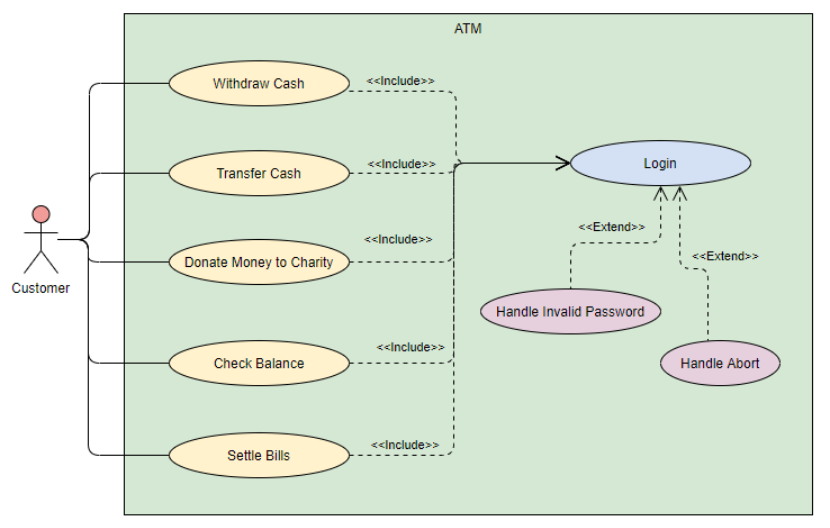
Use case diagrams are created per use case. A visual connection of multiple use cases is not typical, here individual diagrams are used.
To represent boundaries, e.g. of devices, packages can be used.
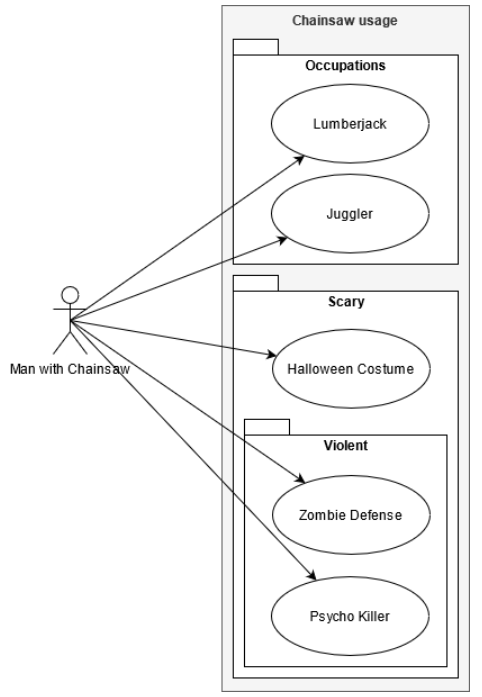
Use case diagrams can be created online: https://app.diagrams.net/
Sequence Diagram
A sequence diagram shows the interaction between several communication partners. Each communication partner is represented by a rectangle (header) with a line (lifeline), which can be dashed and represents the lifetime of the communication partner.
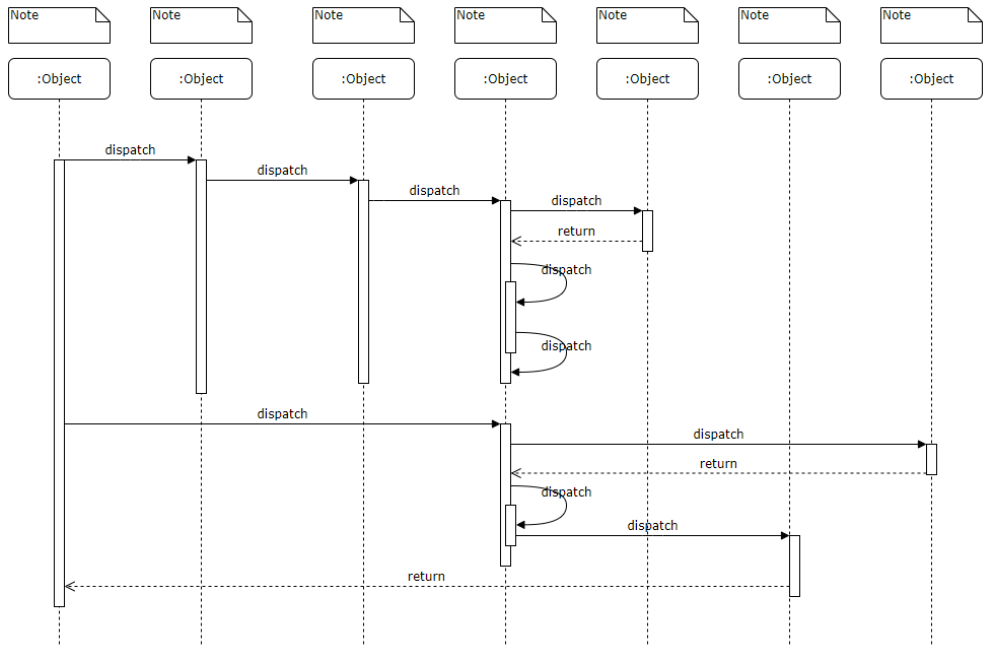
The interaction between communication partners can be done by a synchronous or an asynchronous message. In the synchronous message, the sender waits until the receiver has completed the requested processing. The receiver sends a response message to the sender, which implicitly communicates the end of the requested processing and may also contain response data.
In the asynchronous message, the sender does not wait for the receiver to complete the processing, but continues its own processing in parallel.
Synchronous messages are indicated by an arrow with a filled arrow spit, and asynchronous messages are indicated by an arrow with an open arrow spit. The reply of a synchronous message is a dashed arrow. The amount of time it takes for a communication partner to perform the requested processing can be modeled by a bar on the dashed line.
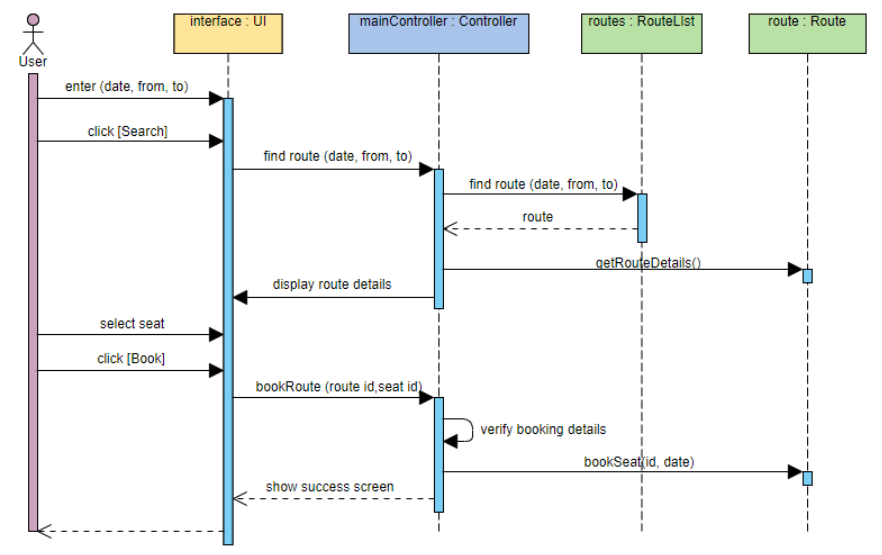
Sequence diagrams can be created online: https://sequencediagram.org/
State Machine Diagram
Procedure & Checklist
Brainstorming
Create a table with the following columns:
- 1st column: All states,
- 2nd column: All events that can occur internally or externally,
- 3rd column: All processing steps that must be listed.
Which states does the automat receive?
- The starting point is the initial state.
- By which events is a state left?
- Which subsequent states occur?
- By what is the state defined (attribute values, object relations)?
Does the state machine need a final state?
- If the final state is reached, the processing of the state machine ends.
- If the state machine describes a life cycle, the termination of the state machine can be equated with the end of life of the object.
- No processing may be performed in a final state; it may not have any output arrows.
Which activities are to be modeled?
- Is there any processing associated with a state diagram?
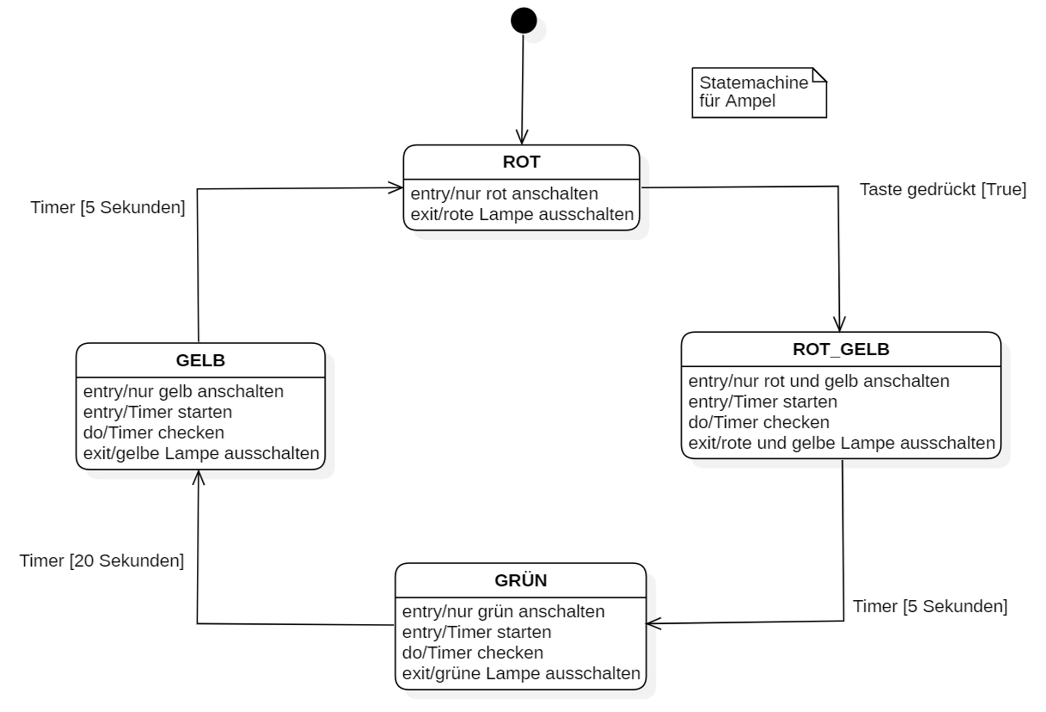
- Do all incoming transitions of a state have the same activity? –> entry activity
- Do all outgoing transitions of a state possess the same activity? –> exit activity
- Is the processing linked to the duration of the state? –> do-activity
Which events are to be modeled?
- External events from the user or from other objects;
- Temporal events (duration, time);
- Internally generated events of the class or use case.
Analytical steps - Appropriate state name.
- Describes a specific time period.
- Does not contain a verb.
Analytical steps - Are all transitions correctly entered?
- Is every state reachable?
- Can each state - except the final state - be exited?
- Are the events of the transition unique?
- Can events occur that are not covered by the specified events?
Source: “UML 2 compact with checklists”, Heide Balzert
Further
State diagrams can be created online on draw.io https://app.diagrams.net/.
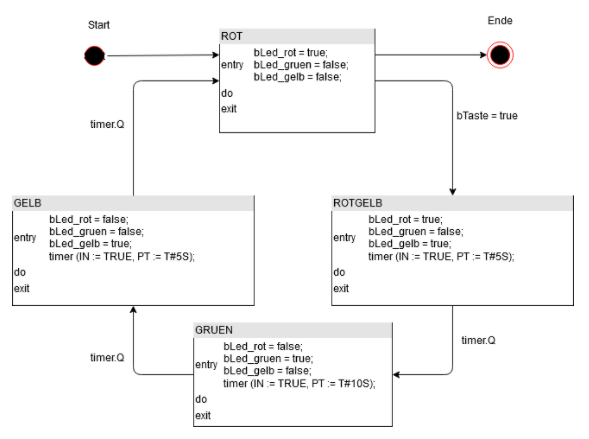
In the literature there are different uses of the “entry”, “do” and “exit” conditions. We use the following notation:
- Entry activity: action which is triggered when entering the state, e.g. light = False
- Do activity: action which is executed as long as you are in this state, e.g. count sheep
- Exit activity: action which is executed when one leaves the state, e.g. sleep = True
https://www.visual-paradigm.com/guide/uml-unified-modeling-language/what-is-state-machine-diagram/
Examples for state diagrams